

Your Instagram and TikTok posts have been showing up in Google search results for a while. You just haven’t been able to see it, or optimize for it, until now.
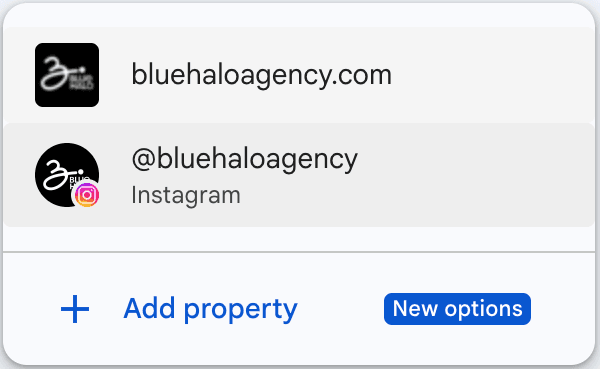
On July 7, 2026, Google announced platform properties inside Search Console, a new property type that lets Instagram, TikTok, X, and YouTube accounts connect directly and see the exact search queries sending people to their posts. Search Engine Journal confirmed the feature is rolling out gradually over the following weeks, and it works even for creators and businesses who don’t have their own website. If you run a small business and post on Instagram or TikTok, this is worth setting up now, both because the data is genuinely useful and because getting your content built around real search queries early puts you ahead before everyone else catches on.
This guide walks through what the update actually does, how to connect your accounts, and how to get started with real Instagram search queries optimization instead of guessing what your audience wants.
What Google Search Console Does
If you’ve never used it, Search Console is Google’s free tool for seeing how your content performs in Google Search. Businesses have used it for their websites for years; it’s how you find out what people typed into Google before landing on your page, how often your pages show up, and how many people actually click through.
Search Console has always been part of the SEO toolkit. It shows you the data; what you do with that data (the actual on-page and content optimization) is the SEO work itself. If your business doesn’t have a website SEO strategy yet, that’s a bigger opportunity than social platform properties alone, and it’s worth pairing the two.
What This Means for Instagram and TikTok
Platform properties extend that same visibility to your social accounts. Once connected, Search Console shows you three real report types:
- Performance report — total clicks, impressions, and related metrics, with filtering and sorting to see which posts and search queries generate the most traffic. Data can also be exported for deeper analysis.
- Insights report — an overview of recent traffic trends, your top-performing content, how people are finding your account on Google, and which countries your audience is coming from.
- Achievements — tracks progress toward milestones, like crossing a new total-click threshold from Search within a 28-day period.
How to Connect Instagram and TikTok to Search Console
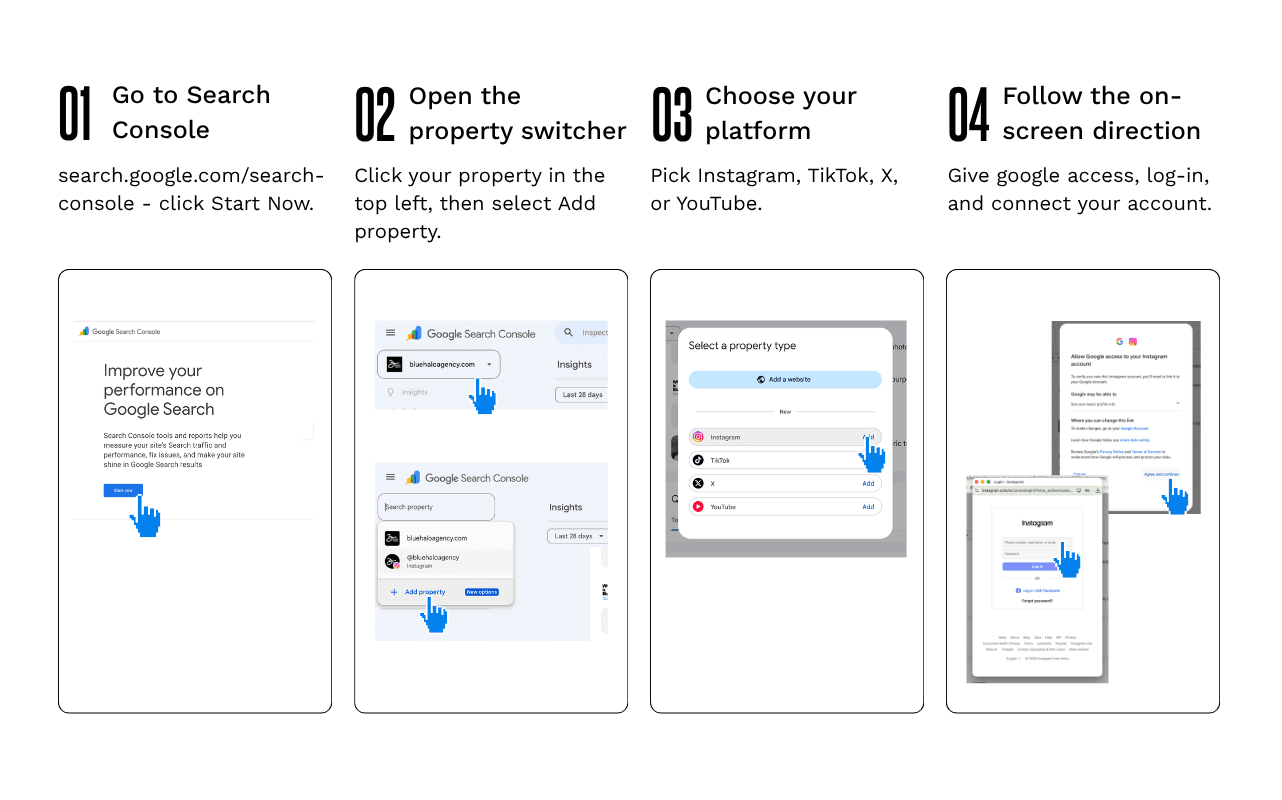
Setup follows Search Console’s normal verification flow:
- Open Google Search Console and sign in
- Go to the property selector and select “Add property”
- Choose Instagram or TikTok as a platform property
- Follow the on-screen prompts to authorize the connection
One shortcut worth knowing: if you’ve already claimed a Google Search profile, your verified accounts are automatically added as properties, so there’s nothing extra to set up.
Turning Search Query Data Into Real Optimization
This is the part that actually moves the needle. Seeing your search queries only matters if you do something with them, and this is really where Instagram SEO and TikTok SEO stop being buzzwords and become real moves you can make today.
Reading Your Search Query Data
The Insights report includes a query groups feature that sorts the terms sending you traffic into top, trending up, and trending down groups, giving you a quick read on where to focus next. For a more real-time view, the Performance report has a 24-hour filter: post new content, then check whether a specific search term is already sending it traffic within the first day. That’s useful for catching a post that’s starting to take off before it’s obvious anywhere else.
Optimizing Instagram Captions and Alt Text for Search
Google reads your caption text the way it reads a webpage. If a search query keeps showing up in your data, work that phrase naturally into future captions instead of relying only on hashtags. Put your main phrase near the start of the caption rather than buried at the end, then let the rest read like a normal caption, avoiding sounding like a keyword list. You can track whether a caption change actually worked, too: Search Console lets you add an annotation marking the date you updated a caption or title, so you can compare performance before and after. This kind of testing is the real substance of Instagram search query optimization — small, deliberate changes checked against real data.
Building Content Around Real Search Queries
Once you know what people are searching for, you can build content around it on purpose. If a search term keeps sending traffic to one Reel, that’s a signal to make a follow-up post, a comparison carousel, or a tutorial answering that same question more directly. Treat your search query report the way you’d treat keyword research for a blog: a real list of Instagram keywords your audience is already searching for.
Comparing Content Types and Platforms
Search Console also lets you compare how different formats perform against each other using a page filter — for example, Instagram posts (URLs containing /p/) against Reels (URLs containing /reels/), or standard videos against Shorts on YouTube. You can go a step further and compare performance across platforms entirely: export the data from each platform property and look at which formats, countries, and queries are driving the most traffic on Instagram versus TikTok. If a topic is working on one platform but not the other, that’s usually a sign to adjust the caption or format, not necessarily the topic itself.
How Small Businesses Should Use This
Check your platform property report on a regular cadence rather than only once when you set it up. Search behavior shifts by season and by what’s happening in your industry, so a query that wasn’t showing up three months ago might be worth building content around today. Watch for sudden spikes in impressions or clicks on older posts, too. If something starts trending again, that’s a good moment to cross-post it on another platform or revisit the topic with a follow-up.
Bring whoever manages your Instagram and TikTok into the habit of glancing at the report before planning content, the same way you’d check any other analytics dashboard before making a decision.
The Bottom Line
Your social content has always had search intent behind it somewhere; this update just makes that intent visible. Connecting your accounts costs nothing and takes a few minutes, and the sooner you start optimizing your search queries across Instagram and TikTok, the more of a head start you have before this becomes standard practice.
If tracking and acting on this data feels like one more thing on an already full plate, that’s exactly where Blue Halo Agency can help.
Talk to Blue Halo Agency about managing your social media and analytics so this kind of insight turns into content rather than sitting in a report nobody has time to read.